Visualize your Python data structure code
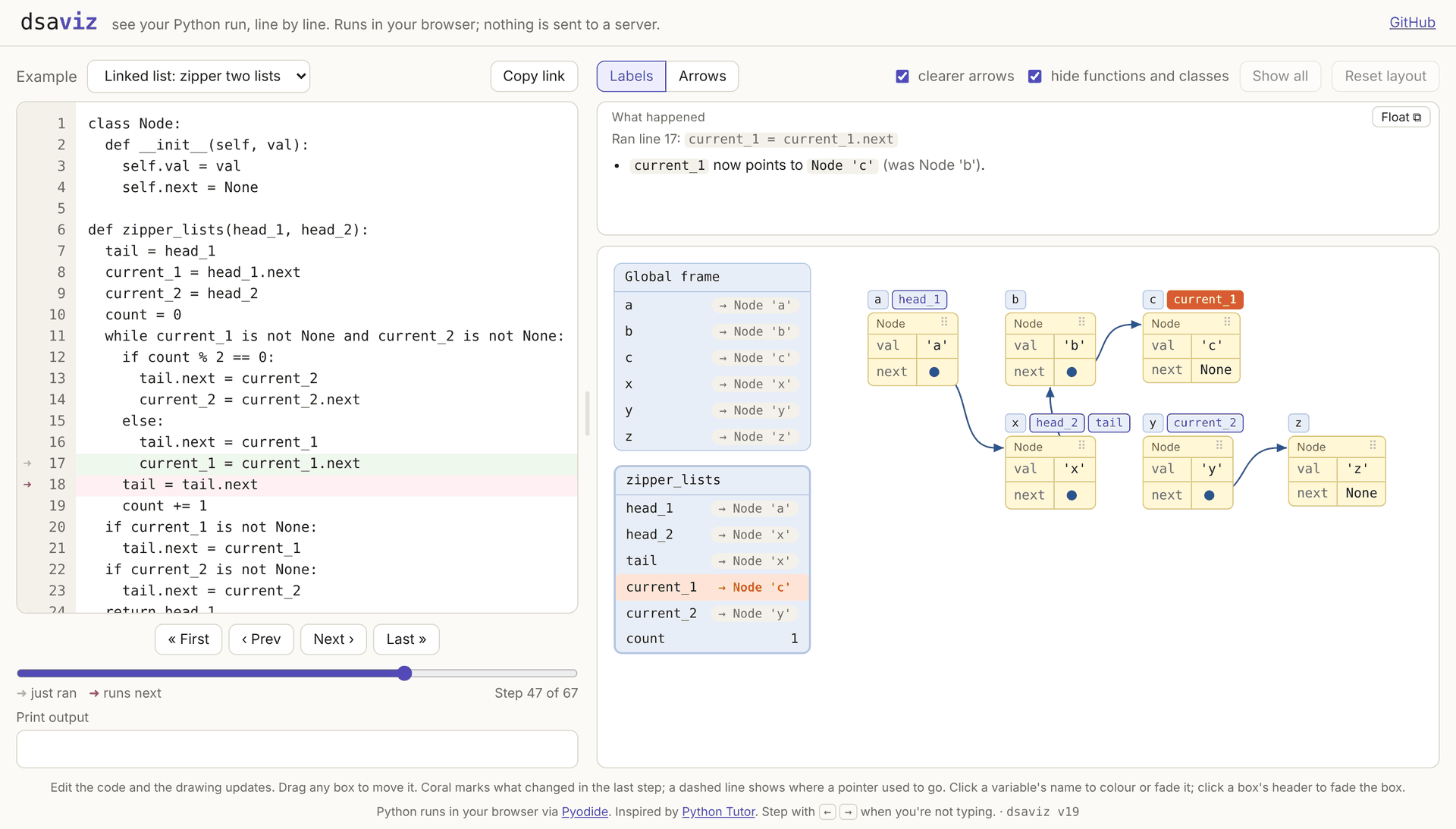
dsaviz runs a Python program one line at a time and draws what’s in memory after each line: variables, lists, dicts and objects, as boxes, with arrows for the pointers between them.
Why I made it
I was stuck on a linked-list problem (zipping two lists together) and couldn’t see why my loop never ended. Python Tutor helped, but once the pointers started moving, its drawing got messy and hard to follow. I wanted the same idea with a calmer picture, all on one page.
How to use it
- Open and.github.io/dsaviz. Pick an example, or paste your own code.
- Press Next (or the → key) to run one line. The line that just ran is green, and the one that runs next is red.
- Watch the drawing. Whatever changed in that step turns coral, and a dashed line shows
where a pointer used to go. The box above the drawing says what happened in plain
English, such as “
current_1now points toNode 'c'(was Node ‘b’)”.
Visualizing trees (Abstract mode)
When learning binary trees, you usually picture nodes as simple circles with their values,
not rectangular tables packed with val, left, and right attributes.
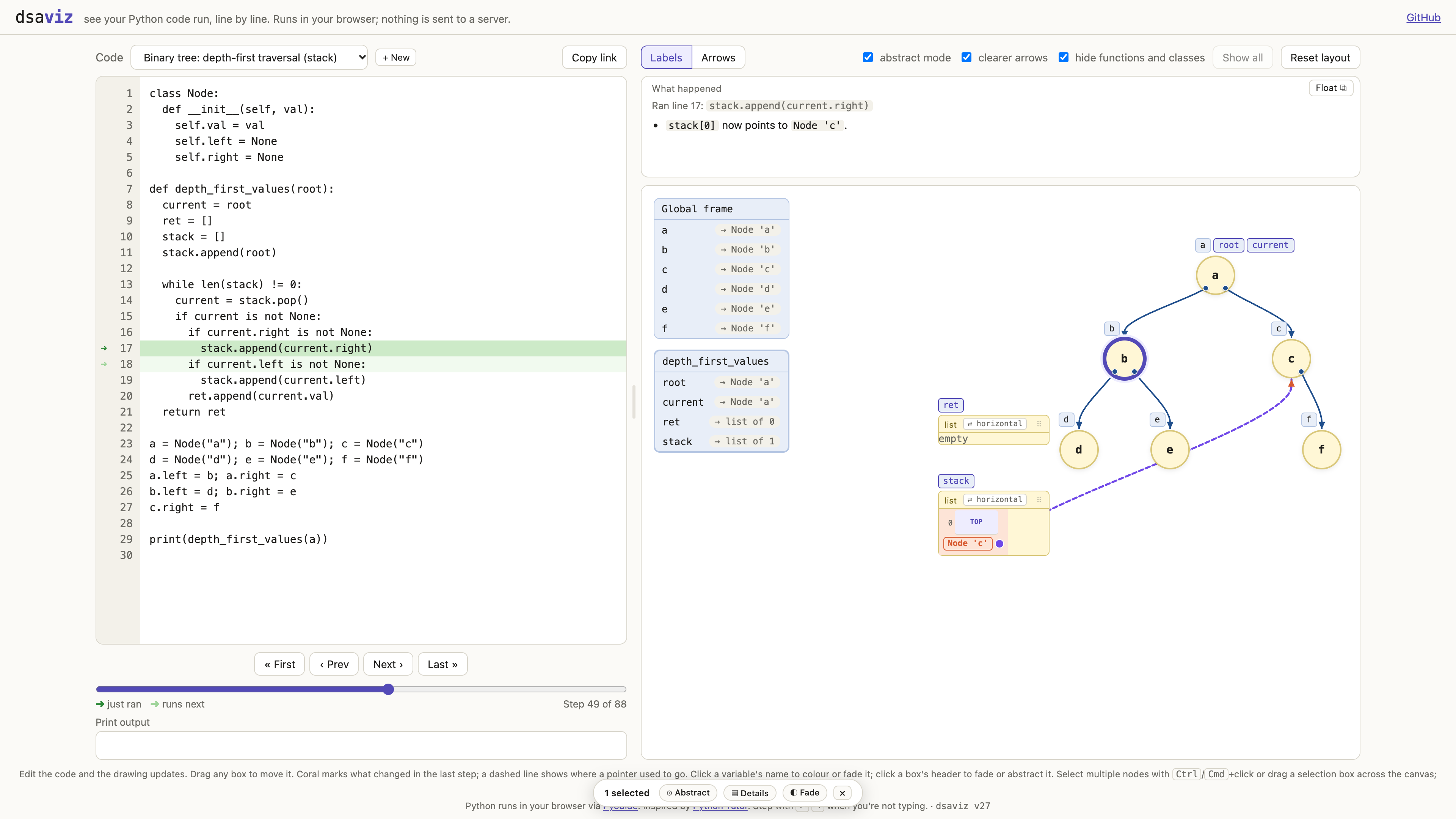
- Abstract circular nodes. Check abstract mode (or press A) to turn instance nodes into compact circles showing only their values. Hovering over any circle reveals a tooltip with its full attributes table. You can also toggle abstract mode per node or on a selection.
- Stack vs tree pointers. References originating from the call stack or a collection (like a traversal stack or queue) are drawn as dashed purple lines with purple endpoints, keeping auxiliary pointers distinct from solid structural tree branches.
- Multi-select and marquee drag. Select multiple nodes with Ctrl/Cmd+click or by dragging a marquee box across the canvas. You can drag selected nodes together as a group to arrange subtrees, and use the floating action bar to abstract, expand, or fade them in one go.
Things that help
- Nodes stay put. Boxes don’t jump around as you step, so you can watch a single pointer move. You can drag any box or group of boxes where you want them.
- Multiple custom snippets. The code selector lets you manage multiple custom snippets
under “Your code” (
+ New,✎ Rename,🗑 Delete). Editing any built-in example automatically forks it into a custom snippet so examples stay clean. - Labels or arrows. Variables can sit as name tags on the box they point to, which keeps the drawing tidy, or be drawn as arrows.
- Colour and fade. Click a variable’s name to give it its own colour, or fade everything else to focus on it.
- Share a link. Copy link puts the code in the URL, so you can send it to someone or bookmark it.
- It remembers. Your snippets, the step you were on, your colours and the layout are all still there after a refresh.
Private by design
Python runs inside your browser using Pyodide, so your code is never sent to a server. The first visit downloads about 10 MB; after that it loads from the cache.
Try it
Open dsaviz. It’s free, and the source is on GitHub. JavaScript support is planned.