UPI Circle: letting someone else pay from your bank account
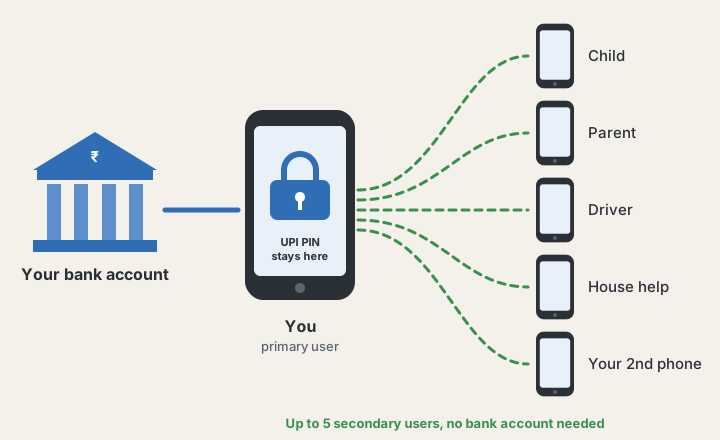
Today I learned about UPI Circle, a UPI feature from NPCI. It lets you (the primary user) give someone else (a secondary user) permission to make UPI payments from your bank account, from their own phone. You never share your UPI PIN, and they don’t need a bank account of their own.
Who it’s for
- People without a bank account. A child, a parent, or someone who works in your house can pay a shopkeeper by scanning a QR code. The money comes from your account.
- People with their own bank account. They can still be in your Circle, for example a family member who pays for shared household costs from your account.
- You, on a second phone. If you carry a second phone that has no bank account linked to it, you can add that phone as a secondary user and pay from it.
In a hurry? Quick summary
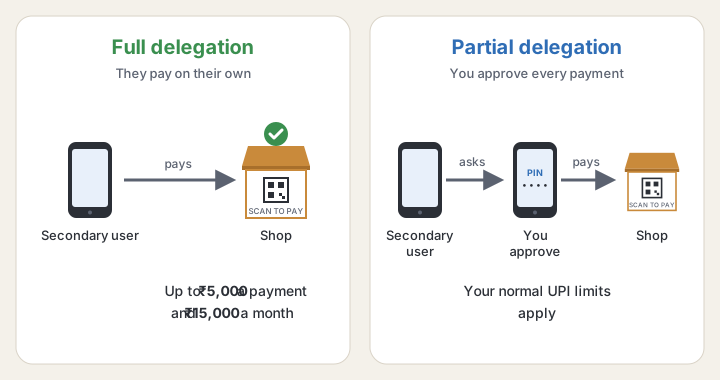
| Full delegation | Partial delegation | |
|---|---|---|
| Who approves each payment | Nobody. The secondary user pays on their own, inside the limits you set | You. Each payment is a request that you approve on your phone with your UPI PIN |
| Per payment | Up to ₹5,000 | Your normal UPI limits |
| Per month | Up to ₹15,000 | Your normal UPI limits |
| How long it lasts | You pick, from 1 month to 5 years | Until you remove them |
Rules that apply to both:
- You can add up to 5 secondary users.
- A secondary user can belong to only one primary user at a time.
- For the first 24 hours after linking, the secondary user can spend at most ₹5,000 in total.
- The secondary user confirms payments with their phone’s biometrics or an app password, not your UPI PIN.
How to set it up
- In your UPI app, open UPI Circle (some apps call it something like “Family and Friends”).
- Add the person by scanning their UPI QR code, entering their UPI ID, or picking them from your contacts. You can’t type a mobile number by hand; this is a safety rule.
- Choose full or partial delegation. For full delegation, set the monthly limit and how long it lasts.
- The secondary user gets a request in their UPI app and accepts it.
You and the secondary user don’t need to use the same app, but both apps must support UPI Circle.
Which apps and banks have it
These lists are from NPCI’s UPI Circle page, checked on 6 October 2026. Apps and banks keep adding UPI Circle, so the lists may be different when you read this. Check NPCI’s page for the latest.
Live apps (9): Amazon Pay, Bajaj, BHIM, City Union Bank App, FamApp, Google Pay, ICICI Bank iMobile, PhonePe and SalarySe.
Live banks (38): Airtel Payments Bank, AU Small Finance Bank, Axis Bank, Bank of Baroda, Bharat Co-operative Bank, Canara Bank, Central Bank of India, City Union Bank, Cosmos Bank, DCB Bank, Dhanlaxmi Bank, Federal Bank, Fino Payments Bank, HDFC Bank, ICICI Bank, IDBI Bank, IDFC FIRST Bank, Indian Bank, Indian Overseas Bank, IndusInd Bank, Jammu and Kashmir Bank, Janata Bank, Karnataka Bank, Karnataka Grameena Bank, Kerala Gramin Bank, Punjab and Sind Bank, Punjab National Bank, RBL Bank, Saraswat Bank, South Indian Bank, State Bank of India, Suryoday Small Finance Bank, SVC Co-operative Bank, Tamilnad Mercantile Bank, TJSB Sahakari Bank, UCO Bank, Union Bank of India and YES Bank.
NPCI’s page doesn’t say which apps offer full delegation. BHIM went live with it on 25 November 2025; for other apps, check inside the app before you count on it.
Staying in control
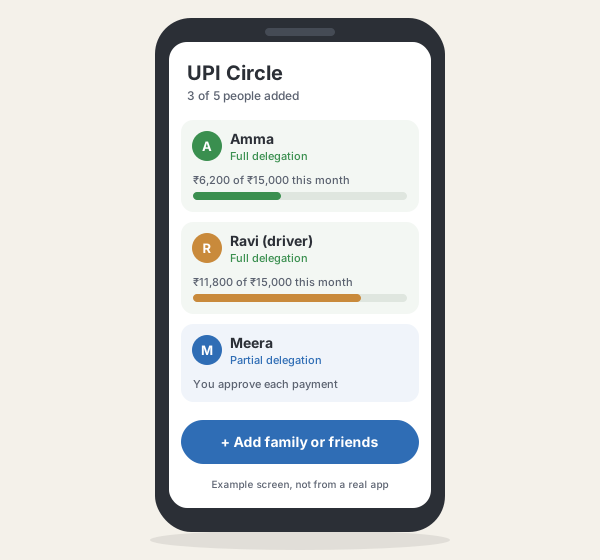 An example of what you might see. Every app lays this out differently.
- Every payment the secondary user makes shows up in your app.
- You can change the limits or remove someone at any time from your UPI Circle settings, and the change takes effect immediately.
- When a full delegation reaches the end of its period, it stops. Set it up again if you want to continue.
Which one to pick: use partial delegation when you want to see and approve each payment, for example for a young child. Use full delegation for someone you trust to pay on their own for small daily costs, such as an elderly parent buying groceries.