Battery Alert app for Android
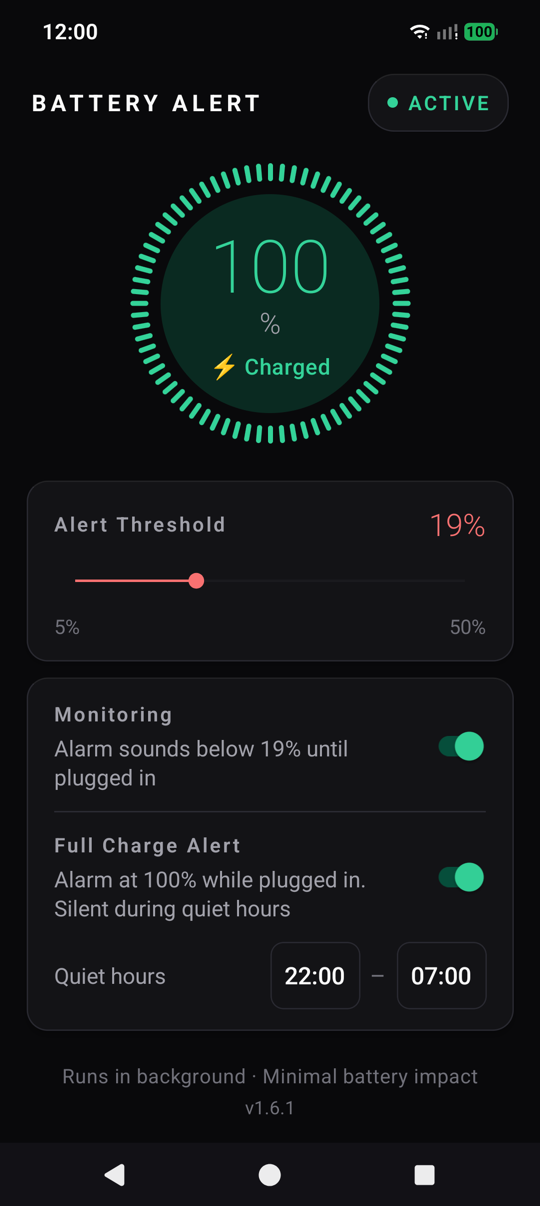
Battery Alert sounds an alarm when your phone’s battery drops below a level you choose. The alarm keeps going until you plug in, so you can’t miss it the way you miss a notification. It can also ring when the battery reaches 100% and the charger is still connected, and it stays quiet at night. This is a short manual for using it.
Contents
Install
- On your phone, download
BatteryAlert-vX.Y.Z.apkfrom the latest release. - Open it. If Android asks, allow your browser to install apps, then tap Install.
- Open Battery Alert and allow notifications.
It isn’t on the Play Store yet, which is why you install it this way. There’s no account to create.
The first time, it asks to turn off battery optimization for the app. Tap Fix Now. Without it, Android may stop the monitoring during calls or music. On a Nothing phone there’s one more step: Open Settings → Battery → Unrestricted.
Set the alarm level
Drag the Alert Threshold slider, anywhere from 5% to 50%. When the battery drops below it, the alarm sounds until you plug in. Tap Snooze 5 min in the app if you need a few minutes to find a charger.
The alarm plays through the alarm volume, so it rings even when the phone is on silent.
Turn monitoring on and off
The Monitoring switch starts and stops everything. While it’s on, a “Monitoring battery…” notification stays in the shade with a small battery icon in the status bar, so you can see at a glance that it’s running. If you swipe the notification away, it comes back.
Monitoring keeps going when you close the app, and starts again by itself after you restart the phone or update the app.
Get told when it’s full
Turn on Full Charge Alert. When the battery reaches 100% with the charger still connected, the alarm sounds. Stop it any of three ways:
- Tap Dismiss on the notification.
- Swipe the notification away.
- Unplug the charger.
It rings once per charge. Plug in again later and it’s ready for the next time.
Quiet hours
Nobody wants an alarm at 3 a.m. because the phone finished charging overnight. Between the Quiet hours (22:00 to 07:00 to begin with), a full battery shows a silent notification instead of ringing. Tap either time to change it.
Quiet hours only affect the full-charge alert. The low-battery alarm always rings, because a dead phone in the morning is worse than being woken up.
Update
Each new version is on the releases page. Download the new APK and install it over the old one; your settings stay. The version you’re running is at the bottom of the app.
If you’re on 1.4.1 or older, uninstall first. Version 1.5.0 changed the app’s signing key, so Android refuses to install over older versions (“App not installed”).
Get it
Download Battery Alert. It’s free, and the source is on GitHub.