How does my heart rate change through the day?
This is the first step of a simple loop: track, become aware, change something, and see progress. I wanted to know which activities make my heart rate climb. My Apple Watch records it all day, but it has no idea what I was doing. A hard debugging session and a quiet read can look the same on a graph, because nothing says which was which. Only I know that, so I built Trace to let me say it.
The question it asks is simple: what is my body doing while I do the things I do?
How it works
- Log in two taps. Tap a label to start and tap Stop to end. There are six starter labels, and any label I type becomes a button for good. I can rename, retime or delete any entry afterwards.
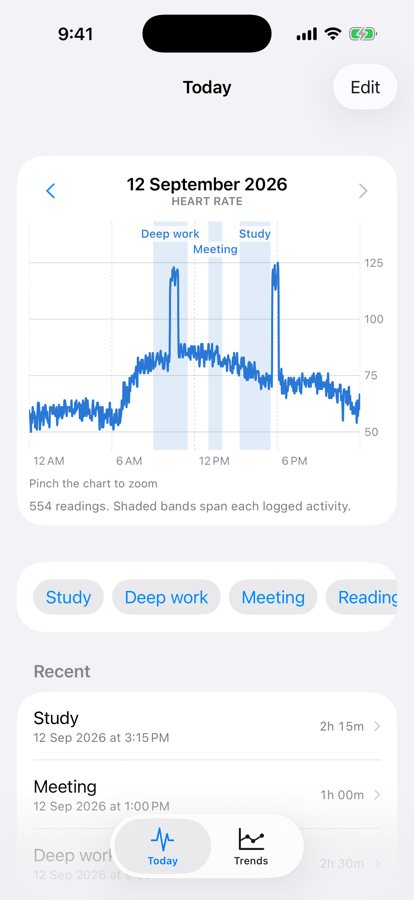
- See it on Today. The app opens on my heart rate across the day, with each activity drawn over it.
- Check the Activity screen. For each logged session it shows the average and peak heart rate inside that window, and how far it ran above my usual rate for those hours. The figure is in beats per minute, not a score, because a score needs a scale to be read against.
Each finished activity is also written to Apple Health as a mindful session, so other health apps can line it up against the same data. That has a cost: Mindful Minutes is the only slot in Health for a stretch of time that isn’t a workout, so my logged study time shares a bucket with real meditation.
Gentle prompts
If I switch it on, Trace asks what I was doing when my watch flags a high heart rate. I answer with one tap, and the activity lands on the chart over the readings that triggered it.
It also sends scheduled check-ins. If it asked only at the high moments, I’d never log an activity at a normal heart rate, and there would be nothing to compare against. Prompts are off by default.
What I tried and removed
An earlier version scored each day’s strain from heart rate variability and resting heart rate. I took it out. Both are measured at or near rest, so the score described the night, not the day. It also couldn’t tell two activities on the same date apart, since they all got that day’s number.
What it deliberately doesn’t do
- It doesn’t run a workout session. That would sample my heart rate about thirty times as often, but every session would then be a workout in Health, and a two-hour study session would add fake exercise minutes to my rings. I accept sparser data instead. The heart-rate line is a connect-the-dots, and detail inside a session can’t be recovered later.
- It doesn’t guess. The label comes from me, or it doesn’t exist.
- It doesn’t send anything anywhere. Activities live on the phone, Health data is read through HealthKit, and there’s no account, server or tracking.
Read it as a question
A heavy study day and a bad night’s sleep tend to arrive together, and the chart can’t separate them. Average heart rate per activity describes my days. It doesn’t prove what caused anything. Short sessions can rest on only two or three readings, so the app marks any session with fewer than five.
Using it
It needs an iPhone on iOS 18 or later and an Apple Watch that I wear regularly. HealthKit returns nothing in the Simulator, so it has to run on a real phone. The source and build steps are on GitHub.